Wednesday, 30 January 2013


BIOS Password Backdoors in Laptops

Synopsis: The mechanics of BIOS password locks present in current generation laptops are briefly outlined. Trivial mechanisms have been put in place by most vendors to bypass such passwords, rendering the protection void. A set of master password generators and hands-on instructions are given to disable BIOS passwords.

When a laptop is locked with password, a checksum of that password is stored to a so-called FlashROM - this is a chip on the mainboard of the device which also contains the BIOS code and other settings, e.g. memory timings.

For most brands, this checksum is displayed after entering an invalid password for the third time:

The dramatic 'System Disabled' message is just scare tactics: when you remove all power from the laptop and reboot it, it will work just as before. From such a checksum (also called "hash"), valid passwords can be found by means of brute-forcing.

The bypass mechanisms of other vendors work by showing a number to the user from which a master password can be derived. This password is usually a sequence of numbers generated randomly.

Some vendors resort to storing the password in plain text onto the FlashROM, and instead of printing out just a checksum, an encrypted version of the password is shown.

Other vendors just derive the master password from the serial number. Either way, my scripts can be used to get valid passwords.

A few vendors have implemented obfuscation measures to hide the hash from the end user - for instance, some FSI laptops require you to enter three special passwords for the hash to show up (e.g. "3hqgo3 jqw5340q1ww294e", "enable master password" shifted one up/left on the keyboard). Some HP/Compaq laptops only show the hash if the F2 or F12 key has been pressed prior to entering an invalid password for the last time.

Depending on the "format" of the number code/hash (e.g. whether only numbers or both numbers and letters are used, whether it contains dashes, etc.), you need to choose the right script - it is mostly just a matter of trying all of them and finding the one that fits your laptop. It does not matter on what machine the script are executed, i.e. there is no reason to run them on the locked laptop.
This is an overview of the algorithms that I looked at so far:

VendorHash EncodingExample of Hash Code/SerialScripts
Compaq5 decimal digits12345pwgen-5dec.py
Windows binary
Dellserial number1234567-595B
1234567-D35B
1234567-2A7B

Windows binary&source
Fujitsu-Siemens5 decimal digits12345pwgen-5dec.py
Windows binary
Fujitsu-Siemens8 hexadecimal digitsDEADBEEFpwgen-fsi-hex.py
Windows binary
Fujitsu-Siemens5x4 hexadecimal digitsAAAA-BBBB-CCCC-DEAD-BEEFpwgen-fsi-hex.py
Windows binary
Fujitsu-Siemens5x4 decimal digits1234-4321-1234-4321-1234pwgen-fsi-5x4dec.py
Windows binary
Hewlett-Packard5 decimal digits12345pwgen-5dec.py
Windows binary
Hewlett-Packard/Compaq Netbooks10 charactersCNU1234ABCpwgen-hpmini.py
Windows binary
Insyde H20 (generic)8 decimal digits03133610pwgen-insyde.py
Windows binary
Phoenix (generic)5 decimal digits12345pwgen-5dec.py
Windows binary
Sony7 digit serial number1234567pwgen-sony-serial.py
Windows binary
Samsung12 hexadecimal digits07088120410C0000pwgen-samsung.py
Windows binary


The .NET runtime libraries are required for running the Windows binary files (extension .exe). If the binary files (.exe) don't work out for you, install Python 2.6 (not 3.x) and run the .py script directly by double-clicking them. Make sure that you correctly read each letter (e.g. number '1' vs letter 'l').

Вячеслав Бачериков has also converted my scripts to javascript so you can calculate the passwords with your browser: http://bios-pw.org/(sources).

Please leave a comment below on what make/model the scripts work. Also, be aware that some vendors use different schemes for master passwords that require hardware to be reset - among them are e.g. IBM/Lenovo. If you find that your laptop does not display a hash or the scripts do not work for you for whatever reason, try to:
  • use a USB keyboard for entering the password for avoiding potential defects of the built-in keyboard,
  • run CmosPwd to remove the password if you can still boot the machine,
  • overwrite the BIOS using the emergency recovery procedures. Usually, the emergency flash code is activated by pressing a certain key combination while powering on the machine. You also need a specially prepared USB memory stick containing the BIOS binary. The details are very much dependent on your particular model. Also, be aware that this can potentially brick your device and should only be done as a last measure.
  • Some dell service tags are missing the suffix - just try the passwords for all suffices by adding -595B, -2A7B and -D35B to your service tags. 
  • The passwords for some HP laptops are breakable with this script.
  • Unlocking methods for some Toshiba laptops are describedhere
  • Some older laptop models have service manuals that specify a location of a jumper / solder bridge that can be set for removing the password.

If none of the above methods work, please use the vendor support.Please understand that my motivation for reverse-engineering comes from a personal interest - I will not accept offers to look at the specifics of certain models.

Tuesday, 29 January 2013

How to remove FBI Your Computer Has Been Locked scam from your computer?

FBI Your Computer Has Been Locked is a screen locker which is created by Internet criminals with the intention of tricking unsuspecting PC users into paying a non existent fine for copyrighted material supposedly detected on their computers. This scam exploits the name of Federal Bureau of Investigation to make it seem more realistic. Notice that FBI has never used and doesn't use such screen lockers to fight Internet piracy, this screen locker was created by Cyber criminals who are hoping that you will fall for this trickery and you will pay a non existent fine to unlock your PC.
This scam is just one of many that attacks computers connected to the Internet, previously seen screen locker which also exploited the name of FBI and uses MoneyPak for payment was named The FBI Federal Bureau of Investigation. Internet criminals also uses a name of McAfee and a badge "This site is secure" to further trick PC users into believing that this screen locker is legitimate. You shouldn't trust this screen, none of the authorities are using such methods to collect fines for copyrighted material. Note that MoneyPak is used to pay the supposed fine to make the tracing of Internet criminals almost impossible. There are several variants of this scam, both uses MoneyPak and has similar deceptive messages.

fbi all activity has been recorded
fbi anti piracy warning
fbi reventon ransomware
FBI "Your computer has been locked" is a scam, don't pay the imaginary fine, you will send your money to Cyber criminals who are responsible for releasing this misleading screen locker. If your computer screen has been locked by this message use the provided removal instructions to eliminate it.
Fake message shown in FBI "Your computer has been locked" scam:
All activity of this computer has been recorded. If you use a web cam videos and pictures were saved for identification. You can be clearly identified by resolving your IP address and the associated host name. Illegally downloaded material (MP3's, Movies or Software) has been located on your computer. By downloading those were reproduced, thereby involving a criminal offense under Section 100 of the Copyright Act. The downloading of copyrighted material via the Internet or music sharing networks is illegal and is in accordance with Section 100 of the Copyright Act subject to a fine or imprisonment for a penalty of up to 3 years.

Furthermore, possession of illegally downloaded material is punishable under Section 184 paragraph 3 of the Criminal Code and may also leed to the confiscation of the computer, with which the files were downloaded.

To unblock your computer and to avoid other legal consequences you are obligated to pay a release fee of $200 Payable through GreenDot MoneyPak. After successful payment your computer will automatically unlock. Failure to adhere to this request could involve criminal charges and possible imprisonment.

FBI "Your computer has been locked" screen locker removal:

Step 1
During your computer starting process press F8 key on your keyboard multiple times until Windows Advanced Options menu shows up, then select Safe mode with networking from the list and press ENTER.
Step 2
Log in to the account that is infected with FBI "Your computer has been locked" scam. Start your Internet browser and download a legitimate anti-spyware program. Update the anti-spyware software and start a full system scan. Remove all the entries that it detects.

Can't boot in Safe Mode with Networking? (FBI "Your computer has been locked" virus blocks Safe Mode with Networking)


If you have more than one user account in your operating system - please log-in to the clean account and download the recommended anti-spyware software, install it and run a full system scan, remove all the security infections it will detect, however if you have only one user account please follow this guide (this guide will show you how to create a new user account using safe mode with command prompt - using this newly created user account you will be able to remove FBI "Your computer has been locked" ransomware).
If FBI "Your computer has been locked" also blocks your operating system's Safe Mode with Networking follow these removal instructions:
1. Start your computer in Safe Mode with Command Prompt - During your computer starting process press F8 key on your keyboard multiple times until Windows Advanced Options menu shows up, then select Safe mode with command prompt from the list and press ENTER.
Boot your computer in Safe Mode with Command Prompt
2. When command prompt mode loads enter the following line: net user removevirus /add and press ENTER.


3. Next enter this line: net localgroup administrators removevirus /add and press ENTER.
creating new user using command prompt
4. Finnaly enter this line: shutdown -r and press ENTER.
adding a new user in command prompt
5. Wait for your computer to restart,  then boot your PC in Normal Mode and login to the newly created user account ("removevirus"). This account won't be affected by the ransomware infection and you will be able to download and install recommended anti-spyware software to eliminate this virus from your computer.
new user account created
6. Download and install recommended anti-spyware software to eliminate this ransomware infection from your computer:

Remover for FBI "Your computer has been locked" virus

If the newly created user account is also affected by the ransomware infection try doing a System Restore:
1. Start your computer in Safe Mode with Command Prompt - During your computer starting process press F8 key on your keyboard multiple times until Windows Advanced Options menu shows up, then select Safe mode with command prompt from the list and press ENTER.
Boot your computer in Safe Mode with Command Prompt
2. When command prompt mode loads enter the following line: cd restore and press ENTER.
system restore using command prompt type cd restore
3. Next type this line: rstrui.exe and press ENTER.
system restore using command prompt rstrui.exe
4. In the opened window click "Next".
restore system files and settings
5. Select one of the available restore point and click "Next" (this will restore your computer's system to an earlier time and date, before the ransomware infiltrated your PC).
select a restore point
6. In the opened window click "Yes".
run system restore
7. After restoring your computer to a previous date download and scan your PC with a recommended anti-spyware software to eliminate any left remnants of "FBI - Your computer has been locked" ransomware.


Alternative FBI "Your computer has been locked" scam removal guide:


If this ransomware blocks your screen when you start your computer in safe mode with networking, try starting your PC in safe mode with command prompt.
1. During your computer starting process press F8 key on your keyboard multiple times until Windows Advanced Options menu shows up, then select Safe mode with command prompt from the list and press ENTER.
win 7 safe mode with command prompt
2. In the opened command prompt type explorer and press Enter. This command will open explorer window, don't close it and continue to the next step.
3. In the command prompt type regedit and press Enter. This will open the registry editor window.
4. In the registry editor window you should navigate to HKEY_LOCAL_MACHINE\SOFTWARE\Microsoft\Windows NT\CurrentVersion\Winlogon\
registy editor winlogon
5. In the right side of the window locate "Shell" and right click on it. Click on Modify. The default value data is Explorer.exe if you see something else written in this window remove it and type in Explorer.exe (you can write down whatever else was written in the value data section - this is a path of the rogue execution file) - use this information to navigate to the rogue executable and remove it.
6. Restart your computer, download and install a legitmate anti-spyware software and perform a full system scan to eliminate any left remnants of FBI "Your computer has been locked" scam.
If you can't start your computer in safe mode with networking (or with command prompt) you should boot your computer using a rescue disk. Some variants of ransomware disables safe mode making it's removal more complicated. For this step you will need access to another computer. After removing FBI "Your computer has been locked" scam from your PC restart your computer and scan it with a legitimate antispyware software to remove any possibly left remnants of this security infection.
Other tools known to remove FBI "Your computer has been locked" scam:
Some malicious software modifies browser settings and disables downloads of spyware and virus removing software. If you have problems downloading anti-spyware software with Internet Explorer, try downloading with Chrome, FireFox, Opera, etc.
If you can't access Internet:

Load your computer in safe mode. Click Start, click Shut down, click Restart, click OK. During your computer starting process press F8 key on your keyboard multiple times until you see Windows Advanced Option menu, then select Safe mode with networking from the list.
Start Task manager. Press ctrl+alt+del (or ctrl+shift+esc) and end task the processes of rogue program. ( if after this procedure you can't access any programs press ctrl+alt+del, click File, select New Task, and type explorer.exe then press OK.

Open Internet explorer, click Tools and select Internet Options. Select Connections, then click LAN settings, if a Use a proxy server for your LAN is checked, un-check it and press OK.

After this procedure you should be able to access Internet. Now you can download anti-spyware software from our "Top spyware removers" section and run a full scan. Download, install and don't forget to update your selected anti-spyware program.

Sunday, 27 January 2013

Rar Password Recovery Magic 7.1 1.21 Full Version Free Download


                                                        1. Install the application.
                                          2. Register the application with the details below:


                                                        Name.....: Abeer Mirza
                                                        Serial...: RPRM2699978


Sunday, 20 January 2013

Eset Nod32 Antivirus and Smart Security 4,5,6 username and password 2013


Daily update eset nod32 antivirus 4-5-6 username and password until 2013.

Username: EAV-76001331
Password: csksdhnh4p
Expiration: 18/02/2013

Username: EAV-76184597
Password: uvrfacrpv4
Expiration: 20/02/2013

Username: EAV-76228369
Password: x8cthu6met
Expiration: 20/02/2013

Username: EAV-77409013
Password: baf5tp5k23
Expiration: 02/01/2013

Username: EAV-77409014
Password: hxf2njeb2u
Expiration: 02/01/2013

Username: EAV-77409015
Password: u6p7mcehrb
Expiration: 02/01/2013

Username: EAV-77409016
Password: pmfvhdr23p
Expiration: 02/01/2013

Username: EAV-77409017
Password: 4sp4f7r7r6
Expiration: 02/01/2013

Username: EAV-77672778
Password: bumrdmrtre
Expiration: 17/03/2013

Username: EAV-77731282
Password: nvf8mspu5c
Expiration: 18/03/2013

Click Here Join My Facebook Group

Saturday, 12 January 2013


DOTA 2 (PC) Free Download Full Version No Torrent


System: Windows ® 7 / Vista / Vista64 / XP
 Processor: Intel Core 2 Duo 2,4 GHz 
Memory: 1 GB for XP / 2GB for Vista, 
Video Card: DirectX 9 compatible video card with Shader 


The game: Dota 2
Genres: MMORTS | RPG 
Interface Language: Russian (the text of), English 
Year of Manufacture: 2012 
Developer: Valve 
Publisher: Valve And behold finally all of have waited exit Dota 2. Who would have thought that from the usual fashion for Warcraft 3, Dota will be one of the most popular online games. Around the world in Dota is played by millions of players. Let's see whether Dota 2 overshadow the success of the first part. For its creation, Valve hired the developers have created a modification of the game and gave them the opportunity to realize their ideas using professional designers and artists from Valve. Previously, the same method appeared mega popular games such as Counter-Strike, Day of Defeat, Team Fortress, Portal, and Alien Swarm. And now it's time for Dota 2. 

Minimum System Requirements:Model 3.0. NVidia 7600, ATI X1600 or better 
Sound Card: DirectX 9.0c compatible sound card Hard Drive: 4 GB


NOTE:THE  SETUP IS IN RUSSIAN LANGUAGE BUT GAME IS IN ENGLISH LANGUAGE


Dota 2 (2012/RUS/ENG)

Dota 2 (2012/RUS/ENG)

Dota 2 (2012/RUS/ENG)


INSTRUCTION

1.UNRAR
2.INSTALL(THE  SETUP IS IN RUSSIAN LANGUAGE)
3.PLAY

Monday, 7 January 2013

Cannot Format Pendrive? Use This Software.

Your pendrive cannot be formatted? You can download a software to format your pendrive. Instruction steps :
1 - Click here to download the software in zip file format.
2 - Use 7zip or Winrar or Winzip to open it.
3 - Copy the SP27608.exe file to your pendrive.
4 - Double click on the SP27608.exe file in your pendrive to install it to your C: drive in your computer.
5 - On your computer, open/run the software to format your pendrive. (Don't choose quick format).

I did try to use this software to format my 64gb and 32gb pendrives, and it works!!! Hopefully it works for your pendrive.


Join My Facebook Group : Click Here

Wednesday, 2 January 2013

Adobe Photoshop CS5 Extended Full Version Free Download

Click Here To join My Facebook Group

What is Photoshop Extended?

Adobe® Photoshop® CS5 Extended software is the ultimate solution for advanced digital imaging, delivering everything in Photoshop CS5 plus breakthrough tools for 3D and motion editing. And now, use it with creativity- and productivity-boosting mobile device apps as they become available.1
What's new in Photoshop Extended?
Content-Aware Fill
Remove any image detail or object and watch as Content-Aware Fill magically fills in the space left behind. This breakthrough technology matches lighting, tone, and noise so it looks as if the removed content never existed.

Enhanced 3D realism and rich materials
Enhance 3D objects and designs with easy shadow creation, image-based lights, and materials like glass and chrome. Explore with different focus points in your 3D scene by adjusting the range for depth of field. 
 
3D extrusions with Adobe Repoussé
Create stunning 3D logos and artwork from any text layer, selection, path, or layer mask with Adobe Repoussé technology. Twist, rotate, extrude, bevel, and inflate your designs.  
Photoshop Touch apps for iPad
Explore exciting ways to interact with Photoshop CS5 from your iPad using apps from Adobe and the developer community. Use your fingertips to mix colors, paint beautiful works of art, activate Photoshop tools, and more1.
How to Install Adobe Photoshop CS5 Full Version
For English Language
Apply The Crack Given according to your OS.
Instruction: Go to your Photoshop Installation Directory (Most Probably " C:\Program Files\Adobe\Adobe Photoshop CS5 " and Replace The amtlib.dll with the new one given in the crack
and Crack is given in Adobe Photoshop CS5 Folder.

For URDU Language
1. Setup Run
2.Select Trail and language Select
3. jab Install ho jayi to Adobe Photoshop CS5 ko Her gaiz run mat ki jiye ga.
4.Crack Folder mian ja ker is file ko "amtlib.dll" Copy ker ki wahan paste kare jahan ap ni Adobe Photoshop CS5 ko Install kiya hai.
5. Adobe Photoshop CS5 Full Version Run


Note :
This is Torrent Download file. You must be Install µTorrent in your System.

Monday, 31 December 2012

Free Download Grand Theft Auto: San Andreas PC Game Full Version Ripped

  • Monster Truck
  • Computer Games
  • Free work from home
  • Earn money from home
  • Business Opportunities
Gta san andreas download
Grand Theft Auto (GTA) San Andreas Download

Grand Theft Auto: San Andreas

Game Description:

Gta san andreas logo
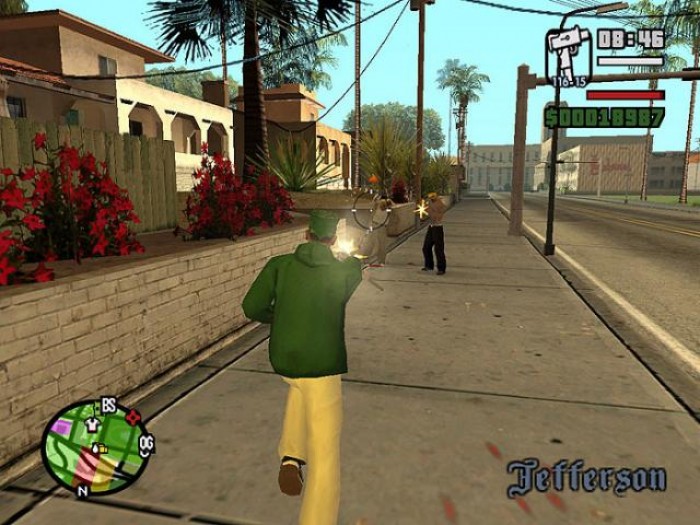
Grand Theft Auto: San Andreas is the fifth game in the GTA series realeased after Gta Vice City. The basic premise remains the same like roam the "sandbox" environments, hijack cars, and complete missions to advance the story. The game's world is significantly larger than in its two immediate predecessors, encompassing three cities and a vast countryside between them, with smaller towns, mountains, rivers, and other places of interest. The interactivity with the environment is enhanced, since the player character can now swim and dive, being able to access every corner of the game world.


The missions vary in structure and gameplay, including chases, races, longer and more intense third-person shooter sequences, as well as a wide variety of vehicles to navigate, which range from different new types of cars (such as lowriders), bicycles, motorcycles, to boats, helicopters, planes, trains, and exotic devices such as monster trucks and jetpacks. Some of the missions involve recruiting gang members and attacking turfs belonging to rival gangs.


As in the previous games, there are many activities to perform outside of the missions. Working as a taxi driver, taking part in races, delivering sick people to hospital, etc., return from the preceding games in the series. San Andreas adds many new activities of its own, some of them with a role-playing flavor. C.J. can go to gym and work out, increasing his stamina. From time to time he has to eat - though overeating will make him look fatter. He is also able to have romantic relationships with certain female characters, asking them out on a dinner, giving them presents, etc.


San Andreas Cheats:

In Grand Theft Auto San Andreas the player can apply different cheats during the gameplay that makes the game easy to some extent and more rocking like you can clear your wanted level by typing "asnaeb" during the gameplay when you wanted level is raised. If you want cheat codes then see Free Gta San Andreas PC Cheats....

System Requirements:

Minimum System Requirements:

OS: Windows 2000/XP
Processor: Pentium 3 @ 1 GHz
Memory: 256 MB
Hard Drive: 3.6 GB Free
Video Memory: 64 MB (GeForce 3)
Sound Card: DirectX Compatible
DirectX: 9.0
Keyboard & Mouse
DVD Rom Drive

Recommended System Requirements:

OS: Windows 2000/XP
Processor: Pentium 4 Processor or Athlon Equivalent
Memory: 384 MB
Hard Drive: 3.6 GB Free
Video Memory: 128 MB (GeForce 4)
Sound Card: DirectX Compatible
DirectX: 9.0
Keyboard & Mouse
DVD Rom Drive

 San Andreas Screenshots 

Gta san andreas Screenshots
Gta san andreas Screenshot
Gta san andreas Screenshots
Gta san andreas download
Gta san andreas Screenshot


 Torrent Link