Friday, 1 February 2013

How to increase your computer or laptop processing speed
      Hey guys now i am going to tell you here how to increase your computer or laptop processing 
      speed. There is the three ways like %temp% type in run in window
      xp to increase the computer speed. Here is the first method:-

    FIRST WAY


  1. First click on start menu in window xp
  2. Then click on run
  3. Type %temp% in run box
  4. Click on ok
  5. Here is the some temporary files of your system, select all and permanently delete them.
Now your computer speed increase.This idea works works in all operating systems.

   SECOND WAY
  1. Click on again start menu
  2. then click on Run
  3. Type msconfig in box
  4. Click on ok
  5. System configuration utility window appears on screen
  6. Click on service tab disable the all extra services that you are not used like infrared monitor,smart card etc.
Now you have found that your computer or laptop speed s increased. This idea is work in all operating systems.

   THIRD METHOD
  1. Click on my computer
  2. Then right click on my computer
  3. Click on properties
  4. System properties window appears
  5. Now click on advance tab
  6. Click on performance settings
  7. Again click on advance tab
  8. Click on change to change the paging file size of your computer
  9. Now change the initial size accordingly
  10. after set click on set
  11. Click on ok
  12. then click on apply and ok
   Now you have obviously found that your computer is increased. This idea work in all operating systems.If you have any                Queries then post it here.....

Thursday, 31 January 2013

How to Speed Up Utorrent 3.1

 I Hope My All Fan Are Fine. So I Share A new posting.
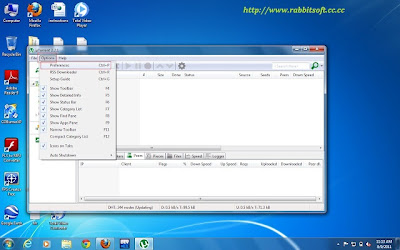
Post title is ''How to speed up uTorrent''.1st download utorrent"Download"
Now Follow these Steps:
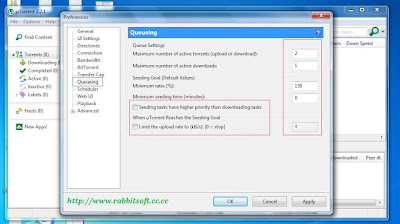
1.Go To Preferences From Option
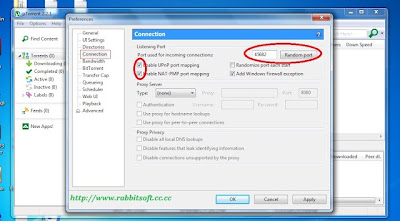
 2.Go To Connection
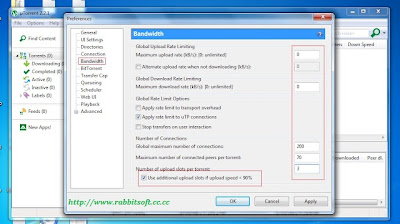
3.Goto Bandwidth
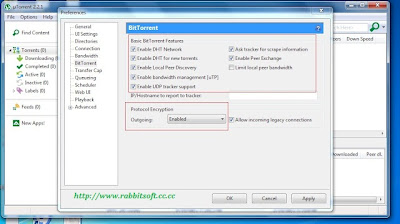
  Option and set the value as shown below
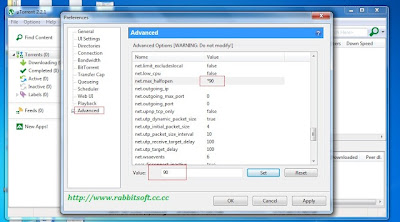
Now Click on Advanced option and search for net.max_halfopen and set its value to 90
Click On Apply And Ok
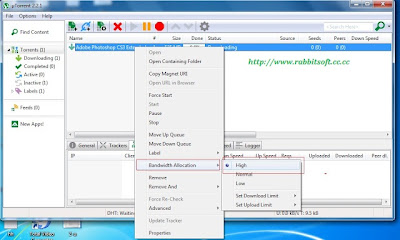
 Now Go On main torrent , right click on your downloading file and select Bandwidth Allocation then High
 
Increase your IDM speed Free

 
Today Our Topic is How To Increase IDM Speed Free Its very easy just follow these step And with screen shot


  1. Open idm 
  2. Go to option 
  3. click on connection
  4. Then you can see Your network "connection type/speed" select your network connection
  5.  Now below select number 16 in "default.max.conn.number:
  6.  Click Ok Now Setting is Done 
  7. Enjoy
  8. Fore More Here http://abeermirza.blogspot.com/


Folder Lock 7 Full Version Free Download


 Folder Lock 7.1.8 Full Version Free Download !14.64MB


Total Video Converter 3.5 Free Download Full Version with Keygen

Total video converter Best video converter For convert video file to many format video to Mp3!
Total Video Converter:The software is designed to convert video for your mobile video player as 3gp, mp4, PSP, PS3, iPod, iPhone etc and also VCD or DVD player, XBOX360.
Supports Format :Convert from Real Video Rmvb (.rm,.rmvb)
Convert from MPEG4 (.mp4)
Convert from 3gp (.3gp, 3g2)
Convert from Game Psp (.psp)
Convert from MPEG1 (.mpg, mpeg)
Convert from MPEG2 PS (.mpg, mpeg, vob)
Convert from MPEG2 TS (DVB Transport Stream)
Convert from DIVX (.divx)
Convert from Ms ASF (.asf, .wmv)
Convert from Ms AVI (.avi)
Convert from Macromedia Flash video FLV (.flv)
Convert from Apple Quicktime (.mov)
Convert from FLIC format (.fli, .flc)
Convert from Gif Animation (.gif)
Convert from DV (.dv)
Convert from Matroska (.mkv)
Convert from ogm (.ogm)